

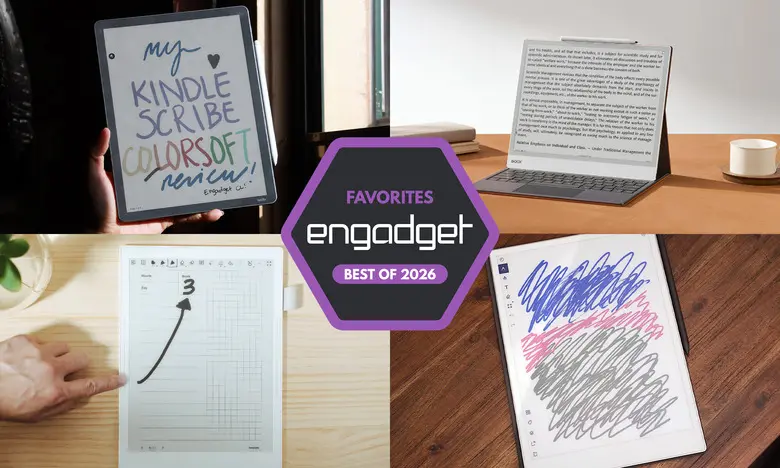
E Ink tablets have come a long way from being simple e-readers. They now combine the satisfying feel of writing on paper with digital convenience, long battery life, and low-glare displays. For people who want a focused tool for reading, note-taking, and document annotation, these devices can be a great alternative to a traditional tablet. The following list details the best E Ink tablets for 2026, based on hands-on testing, performance, display quality, stylus experience, and price.
Best E Ink tablets for 2026
reMarkable 2: Best E Ink tablet for most people
Screen: 10.3 inches | Battery: Two weeks | Connectivity: Wi-Fi | Storage: 8GB | Stylus: Not included in some bundles | Supported files: PDF, EPUB
The reMarkable 2 is the most balanced E Ink tablet for most people. It has a 10.3-inch monochrome digital paper display and weighs less than a pound. The build is sleek, with beige bezels and a slim silver edge for accessories. Writing feels close to real paper because the latency is very low. The Marker Plus has an eraser, but both stylus options are tilt- and pressure-sensitive and need no charging. For reading, the device supports PDFs and EPUBs, and files can be added through reMarkable's desktop or mobile app, or by connecting Google Drive, Microsoft OneDrive, or Dropbox. A Chrome extension can send online articles directly to the tablet. The software is easy to learn, and a Connect subscription adds cloud sync and mobile editing. The tablet costs $399 with the standard Marker, or $449 for a bundle with the Marker Plus.
Pros: Great reading and writing experience; Google Drive, OneDrive, and Dropbox support; easy to use.
Cons: Marker can cost extra; expensive; unlimited cloud storage requires a subscription.
reMarkable Paper Pro: Best premium E Ink tablet
Screen: 11.8 inches | Battery: Two weeks | Connectivity: Wi-Fi | Storage: 64GB | Stylus: Not included | Supported files: PDF, EPUB
The reMarkable Paper Pro is a significant upgrade over the reMarkable 2. It has an 11.8-inch color display using Canvas Color technology, which can produce thousands of colors. The processor is faster, the pen latency is only 12ms, and the 5.1mm-thick body feels premium. The software remains clean and distraction-free, matching the simplicity of the reMarkable 2. The optional Connect subscription costs $3 per month or $30 per year and provides unlimited cloud storage and mobile editing. The Paper Pro is priced at $629 with the standard Marker. It is expensive, but it delivers one of the most refined E Ink writing experiences available.
Pros: Color is a welcome addition; backlight works well in dark environments; vastly improved performance.
Cons: Expensive.
Amazon Kindle Scribe: Best e-reader E Ink tablet
Screen: 11 inches | Battery: Months | Connectivity: Wi-Fi, Bluetooth | Storage: Up to 64GB | Stylus: Included | Supported files: AZW3, AZW, TXT, PDF, MOBI, PRC, and more
The latest Amazon Kindle Scribe improves on an already strong formula. It has a larger 11-inch screen, a faster processor, and a refined front light system. Writing latency is lower than before, and the included pen feels better in the hand. The device integrates seamlessly with Kindle books, so you can highlight text, add sticky notes, and use notebooks. However, marking up Kindle books is still not as natural as writing in the margins of a physical book. The new Home page makes it easy to jump back into recent books and notes. AI Search is a mixed bag, but it can be useful for students and researchers. The Scribe line starts at $430 for a model without a front light, while the recommended model with the improved front light costs $500. There is also a $630 Scribe Colorsoft with a color display.
Pros: Fast and smooth performance; low-latency writing; seamless Kindle integration; premium pen included.
Cons: AI Search could use work; marking up Kindle books is inconsistent.
Supernote A6 X2: Best E Ink tablet for writing and note-taking
Screen: 7.8 inches | Battery: Weeks | Connectivity: Wi-Fi, Bluetooth | Storage: 32GB, expandable up to 2TB | Stylus: Not included | Supported files: PDF, EPUB, Word, TXT, PNG, JPG, CBZ, FB2, XPS
The Supernote A6 X2 is a compact E Ink tablet built for serious note-takers. It has a 7.8-inch screen and a FeelWrite 2 screen protector that feels smoother than most competing tablets. There are dual sidebars for left- and right-handed users, and the screen can auto-rotate. The device is user-repairable, with a replaceable battery and microSD card slot. It supports many file formats and offers powerful organizational tools like keywords, bookmarking, and handwriting recognition. The Atelier painting app adds artistic options. The software is not as polished as that of the reMarkable or Kindle Scribe, so some tinkering is required. The Nomad A6 X2 costs $329, while the larger Manta A5 X2 costs $505. Pens cost $89 or more. There is no backlight, which can make reading in dim light more difficult.
Pros: Excellent writing experience; tons of notebook customization options; good handwriting recognition.
Cons: Pen costs extra; no backlight.
Onyx Boox Note Air4 C: Another color-display option
Screen: 10.3 inches | Battery: Weeks | Connectivity: Wi-Fi, Bluetooth | Storage: 64GB | Stylus: Included | Supported files: PDF, PPT, EPUB, TXT, DJVU, HTML, RTF, FB2, DOC, MOBI, CHM, PNG, JPG, TIFF, BMP
The Onyx Boox Note Air4 C is a color E Ink tablet that runs Android 13, giving you access to the Google Play Store. You can install Kindle, Kobo, web browsers, and other Android apps. The writing experience is low-latency, and the Notebook app includes multiple brush types, color ink options, and shape tools. AI recognition can convert handwritten pages into typed text. You can also add web pages and voice recordings to notes, then share them as PDFs or PNGs. The tablet is versatile, but it is not as user-friendly as other options. The bundle with a stylus and folio case costs $529. Because it is an E Ink device, it is not ideal for watching videos, but it is excellent for reading and writing across many apps.
Pros: Color E Ink display; Android 13 with Google Play access; many ways to add files; stylus included.
Cons: E Ink screen limits video use; not as user-friendly as others; expensive.
Onyx Boox Note Max: A big-screen option
Screen: 13.3 inches | Battery: Weeks | Connectivity: Wi-Fi, Bluetooth | Storage: 128GB | Stylus: Included | Supported files: PDF, PPT, EPUB, TXT, DJVU, HTML, RTF, FB2, DOC, MOBI, CHM, PNG, JPG, TIFF, BMP
The Onyx Boox Note Max has a massive 13.3-inch E Ink Carta 1300 display with a sharp 300dpi resolution. It is one of the few large-format E Ink tablets from a major manufacturer. The note-taking and doodling experience is remarkable because the screen gives you plenty of room for sketches, diagrams, and long-form writing. One standout feature is the Calendar Memo app, which lets you attach notes to individual days and see your reading and writing history in one place. The tablet runs Android 13 and supports Google Play. It costs $689 and includes a stylus and cover. There is no front light, and the software requires some adjustment for new users.
Pros: Sharp E Ink Carta 1300 display; large 13.3-inch screen; Android 13 with Google Play access; stylus and cover included.
Cons: No front light; not as user-friendly as other options; expensive.
reMarkable Paper Pro Move: Honorable mention
Screen: 7.3 inches | Battery: Two weeks | Connectivity: Wi-Fi | Storage: 64GB | Stylus: Included | Supported files: PDF, EPUB
The reMarkable Paper Pro Move is a smaller and more portable version of the Paper Pro. It has a 7.3-inch Canvas Color display and a steno-pad-like design. The build quality is excellent, with solid ridged edges and a comfortable writing surface. The marker attaches magnetically to the side, and an optional folio protects the screen. Software features include drag-and-drop toolbar, note search, and handwriting-to-text conversion. The Move costs $449 with the standard marker. It is a good choice for people who want a premium reMarkable experience in a more compact size, though the lack of a keyboard folio and limited file format support may be drawbacks.
Pros: Compact size; excellent build quality; good battery life.
Cons: Expensive for a small tablet; no keyboard folio option; limited to on-screen keyboard.
Kobo Libra Colour: Honorable mention
Screen: 7 inches | Battery: Up to 40 days | Connectivity: Wi-Fi, Bluetooth | Storage: 32GB | Stylus: Not included | Supported files: EPUB, EPUB3, FlePub, PDF, MOBI, JPEG, GIF, PNG, BMP, TIFF, TXT, HTML, RTF, CBZ, CBR
The Kobo Libra Colour adds a color display and stylus support to Kobo's popular e-reader design. You can highlight text, write in the margins of ebooks, and create notebooks. The seven-inch screen is crisp and has warm light controls. The stylus is responsive and offers multiple pen styles plus a highlighter. The device integrates with Dropbox and Google Drive, making it easy to get files on and off. The Libra Colour costs $219, but the stylus costs an additional $70, bringing the total to around $300. It is a strong alternative to the Kindle Scribe for those who prefer Kobo's ecosystem and margin annotations.
Pros: Color display; low-latency stylus performance; can write in the margins of any ebook.
Cons: Smaller screen; stylus costs extra.
Are E Ink tablets worth it?
E Ink tablets are a worthwhile purchase for a specific group of people. If you prefer the look and feel of an e-paper display over an LCD, or if you want a paper-like writing experience without using a traditional tablet, they make a lot of sense. They are also valuable for people who want fewer distractions because they are not designed for social media, games, or endless video streaming. However, E Ink displays have noticeable refresh rates and muted colors compared with modern LCD and OLED panels. If you need a full-featured tablet for browsing, video, and a wide range of apps, an iPad or Android tablet is still a better choice. The real advantage of E Ink is focus: these tablets do fewer things, but they do reading and writing exceptionally well.
What to look for in an E Ink tablet
Writing and latency
The most important factor is the writing experience. Latency, or the delay between your pen strokes and the appearance of ink, should be low enough to feel natural. Most modern E Ink tablets have made huge progress in this area, but there are still differences. Some devices also include a stylus in the box, while others require a separate purchase. Consider your budget and whether the stylus feels comfortable in your hand.
Reading
Think about how much you plan to read on the device. Larger screens are better for writing and reading documents, but they can be heavier and less comfortable for long reading sessions. File format support is also critical. Tablets from Amazon and Kobo automatically work with their respective ebook stores, while Android-based tablets like the Boox Note Air4 C can install Kindle and Kobo apps. If you already own many ebooks, check whether those titles can be transferred to the E Ink tablet you are considering.
Search functionality
Search features vary widely. Some tablets let you search handwritten notes, while others only search typed text. If you plan to refer back to notes and highlights, look for a device with handwriting recognition and easy navigation. The Supernote and reMarkable tablets both have useful tools for organizing notes, while the Kindle Scribe keeps annotations attached to the pages where you made them.
Sharing and connectivity
Most E Ink tablets support Wi-Fi, and some offer cloud sync or companion mobile apps. If you want to access your notes on your phone or laptop, check whether the device supports automatic syncing or manual export. The reMarkable Connect subscription adds cloud storage, and Kobo and Supernote devices support Dropbox and Google Drive. None of these tablets integrate directly with Evernote or OneNote, so plan to export notes manually if you rely on those apps.
Price
E Ink tablets generally cost between $300 and $800, which is similar to mainstream tablets. Price usually increases with screen size and features like color displays and backlighting. Some manufacturers have recently raised prices due to supply chain and operational costs. The reMarkable Paper Pro, for example, now costs $629, while some Supernote and Boox models have also become more expensive. Determine which features matter most to you and how much you are willing to spend.
Other E Ink tablets we've tested
Onyx Boox Tab X C
The Boox Tab X C is a color-screened version of the Tab X with a 13.3-inch Kaleido 3 E Ink display. It runs Android 13, has an octa-core processor, 6GB of RAM, and a slim 5.3mm body. The device is powerful and great for large-format writing, but it is expensive at $820 with the standard case and $970 with the keyboard case. It is best for people who want a premium, full-featured E Ink tablet.
Lenovo Smart Paper
Lenovo's Smart Paper has solid hardware and good Google Drive integration, but it is too expensive and too dependent on Lenovo's companion cloud service. In the UK, the service costs £9 per month for three months, which adds up quickly. The software is less flexible than that of the reMarkable 2 or Supernote Nomad, so it did not earn a place on our top list.
Onyx Boox Tab Ultra
The Boox Tab Ultra runs Android 11 and can be paired with a magnetic keyboard case, turning it into a low-powered 2-in-1 laptop. You can browse the web, check email, and even watch YouTube videos, but the E Ink screen is not ideal for those activities. A traditional 2-in-1 laptop with a responsive display is a better fit for people who need an all-purpose device. The Tab Ultra is specifically for people who prioritize reading comfort and eye health above all else.
Source: Engadget News